

How to Build an SEO-Optimized Website from Scratch (Complete Guide 2026)
 Catalin Dinca
Most business owners launch a website expecting organic traffic to follow naturally. It rarely does.
A well-designed site with no SEO foundation is just a digital brochure. The gap between "live on the internet" and "ranking on Google" is wider than most people realize — and it starts long before you write a single word of copy or choose a color scheme.
The businesses that win at organic search do not get lucky. They make deliberate decisions at every stage of the build — decisions about goals, platform, structure, technical foundations, and content strategy — that compound over time into sustainable ranking positions.
This guide walks you through every stage of building an SEO-optimized website from scratch. Whether you are starting a new site or rebuilding an existing one, the principles are the same: get the foundations right first, and the rankings follow.
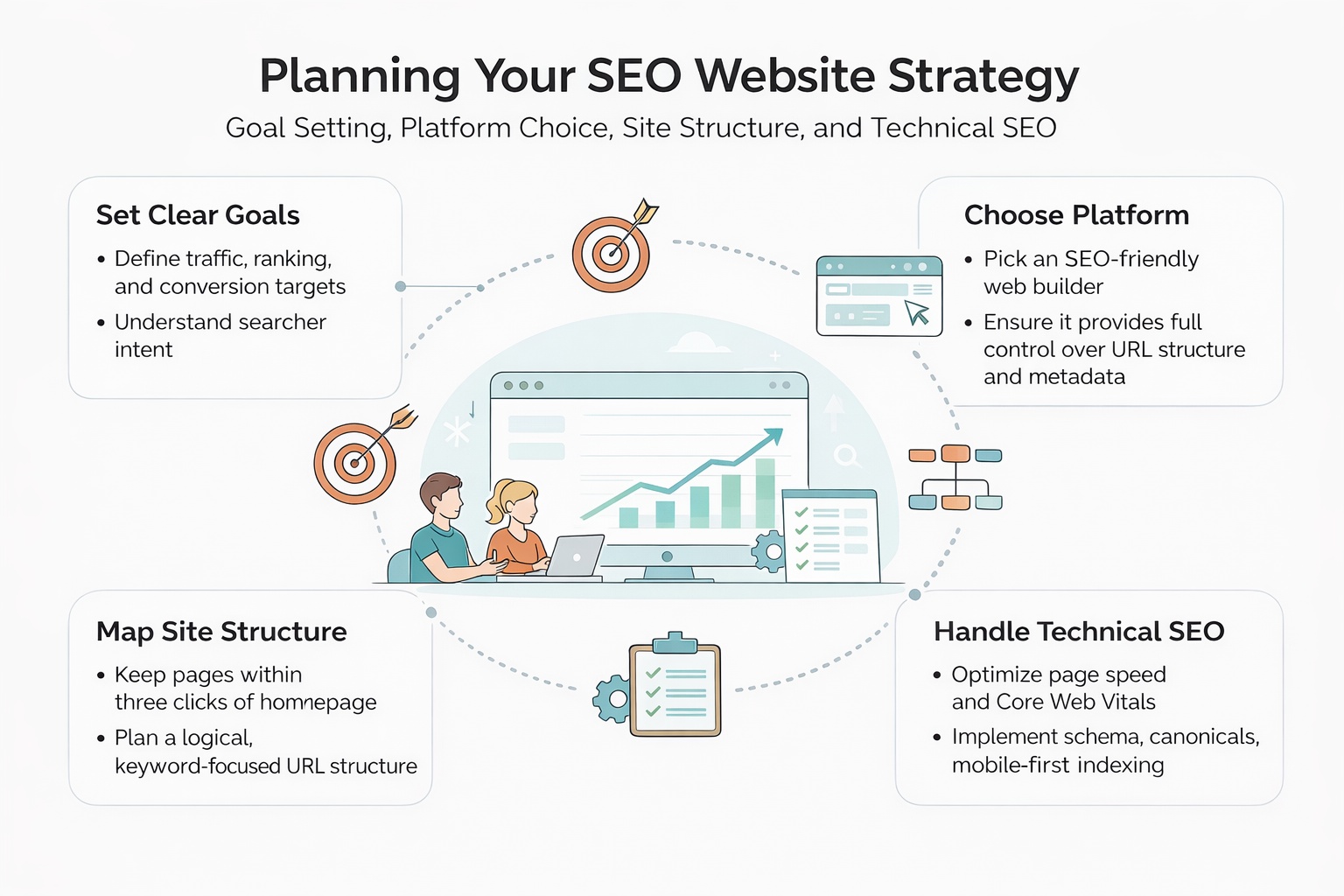
Step 1: Define Your Goals and Target Audience Before You Build
Before touching a single design element, you need to know exactly what you want your website to accomplish. This sounds obvious, but most teams skip straight to design and wonder later why traffic never arrives.
Start With Your Core Business Goal
Every SEO decision flows from your business goal. The three most common goals are generating direct revenue from product sales, generating leads for a service business, and building topical authority in a niche. Each one leads to a completely different site structure, content strategy, and keyword focus.
A local service business targeting clients within 50 kilometers needs a very different architecture than a SaaS company targeting national search traffic. A content publisher monetizing through ads needs a different structure than an e-commerce store competing on product keywords. Defining this upfront shapes everything that follows.
Map Your Target Audience by Search Intent
Once your business goal is clear, map out your target audience in detail — not just demographics, but search intent profiles. The three questions that matter most are what problems they are trying to solve, what keywords they type into Google when they have those problems, and what stage of the buying journey they are in when they land on your site.
Search intent falls into four categories that Google itself uses to evaluate whether a page deserves to rank for a query:
Understanding which intent drives each keyword you target determines the content format, page depth, and call-to-action structure for every page you build.
Set Specific, Measurable SEO Targets
Your SEO outcomes need to be concrete from day one. Vague goals like "get more traffic" give you nothing to measure against. Concrete targets force you to think realistically about what is achievable and create the benchmarks you need to evaluate whether your strategy is working.
Think in terms of:
| Goal Type | Example Target | Measurement Tool |
|---|---|---|
| Organic traffic | 5,000 monthly visitors in 6 months | Google Analytics |
| Keyword rankings | Top 5 for 10 target keywords | Google Search Console |
| Lead generation | 50 qualified leads per month | CRM or contact forms |
| Conversion rate | 3% of organic visitors convert | Analytics goals/events |
Setting these numbers early creates the feedback loop your entire SEO strategy depends on.
Step 2: Choose the Right Platform for SEO
The platform you build on has a direct impact on how much technical control you have over your site's SEO. This is where many business owners make costly mistakes by choosing platforms that look polished in demos but create serious ranking limitations under the hood.
Understanding the Trade-offs
The fundamental trade-off in platform selection is between ease of use and SEO flexibility. Platforms designed to be accessible to non-technical users typically achieve that accessibility by abstracting away the technical layers where much of SEO happens. Platforms that give you full technical control typically require more technical knowledge to maintain.
| Platform | SEO Flexibility | Automation Support | Technical Complexity |
|---|---|---|---|
| WordPress | Very high | High via plugins and APIs | Moderate |
| Webflow | High | Moderate | Low to moderate |
| Shopify | Moderate | Moderate via apps | Low |
| Squarespace | Low to moderate | Low | Very low |
| Custom build | Maximum | Maximum | Very high |
For most businesses focused on organic growth, WordPress remains the most flexible option because of its plugin ecosystem, the ability to implement advanced technical SEO configurations, and its compatibility with virtually every automation and analytics tool on the market. That said, the best platform is always the one your team can realistically maintain and scale over time.
Non-Negotiable SEO Platform Requirements
Regardless of which platform you choose, verify that it supports all of the following before you commit:
- Clean, fully customizable URL structures with no forced parameters
- Full control over meta titles and descriptions on every page type
- Easy implementation of JSON-LD schema markup
- Direct access to robots.txt and canonical tag management
- Fast page load times and mobile-responsive themes out of the box
- Automatic XML sitemap generation and easy submission to Search Console
- The ability to set noindex tags on individual pages and page types
- Header tag customization (H1, H2, H3) independent of visual styling
Platforms that restrict access to any of these controls will suppress your rankings no matter how good your content is.
A Note on JavaScript-Heavy Frameworks
If your team is considering a JavaScript-heavy framework like Next.js, Nuxt, or a single-page application architecture, be aware of the indexing implications. Googlebot renders JavaScript, but there can be significant delays between when a page is published and when Google actually processes and indexes its content.
For SEO-critical pages — your homepage, service pages, category pages, and high-priority content — prioritize server-side rendering or static generation. This ensures Googlebot sees the fully rendered content on first crawl, eliminating the rendering delay that can hold back rankings for weeks.
Step 3: Build a Site Structure That Google Can Crawl
Site structure is arguably more important than the platform itself. Google crawls your site by following links, and how you organize those links determines which pages receive authority, which pages get crawled regularly, and which pages rank for competitive keywords.
The Flat Architecture Principle
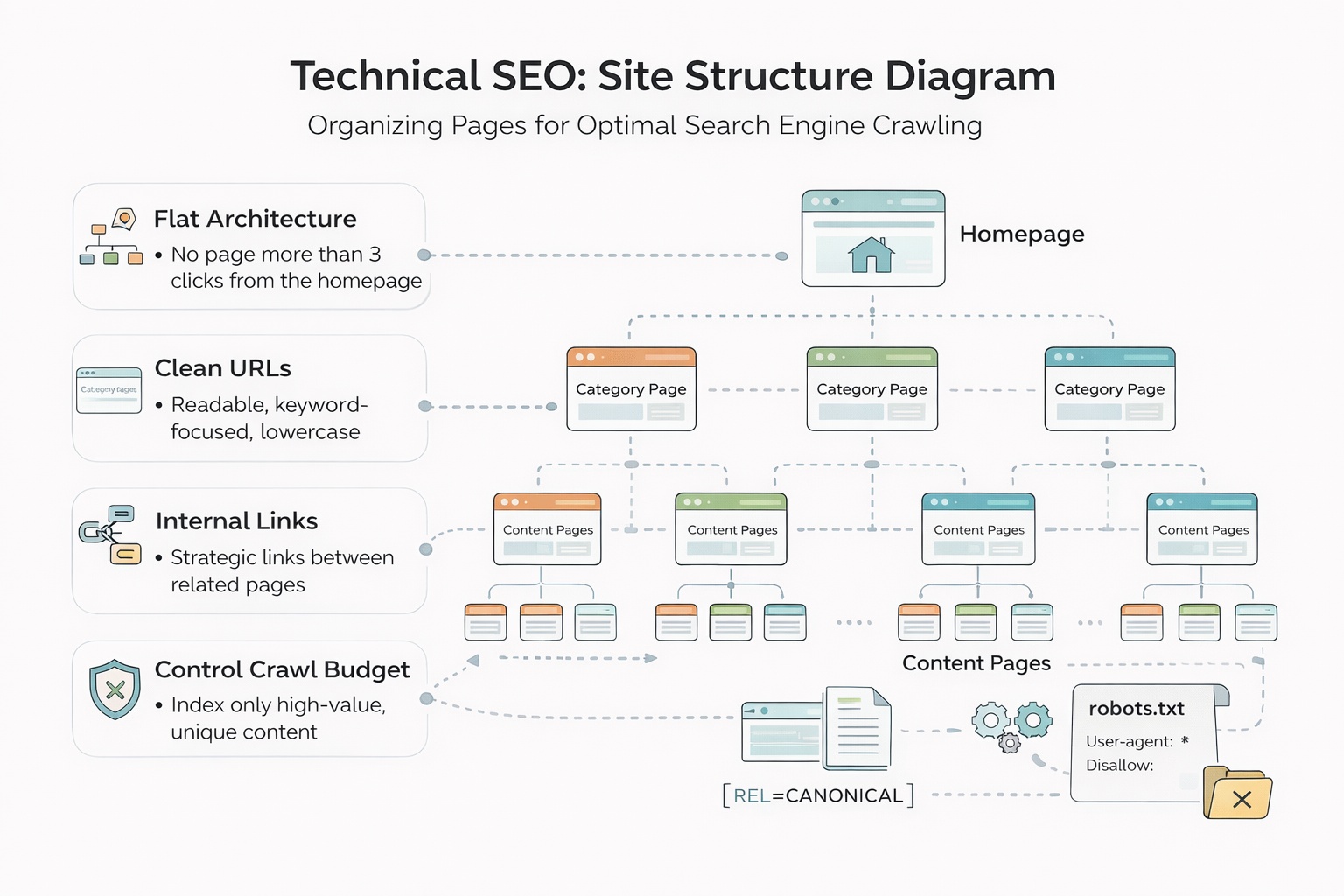
A flat, shallow structure where important pages are reachable within two or three clicks from the homepage consistently outperforms deep, nested architectures. The logic is simple: every click away from the homepage represents a reduction in the authority passed to that page through internal links.
Think of your site structure as a three-level hierarchy:
- Level 1: Homepage — the highest authority page on your site
- Level 2: Main category, service, or topic pages — the pillars of your content strategy
- Level 3: Individual blog posts, product pages, location pages, and supporting content
Every page that matters for your business should be reachable in three clicks or fewer from the homepage. Pages buried four or five levels deep receive substantially less crawl attention and are significantly harder to rank for competitive terms.
Map Your Full URL Structure Before Publishing a Single Page
This is the single most valuable exercise you can do before launch. Open a spreadsheet and map every URL your site will have. For each URL, specify whether it should be indexed by Google, noindexed, or canonicalized to another URL.
This exercise forces you to confront the categories of pages that silently destroy SEO performance:
- Tag and category archive pages auto-generated by your CMS that add hundreds of thin pages with no ranking value
- Filter and parameter URLs on e-commerce or listing sites that create thousands of near-duplicate pages from a single underlying dataset
- Pagination pages that dilute link equity across dozens of versions of the same content
- Author archive pages and date-based archives that serve no search intent
- Duplicate content created by your CMS generating both www and non-www versions, HTTP and HTTPS versions, or URLs with and without trailing slashes
Use noindex tags, canonical URLs, and robots.txt directives proactively to keep your index clean from day one. Cleaning up index bloat on a live site with thousands of pages is one of the most time-consuming and disruptive SEO tasks that exists. Preventing it costs almost nothing during the build.
Step 4: Handle Technical SEO During the Build
Most technical SEO problems are significantly easier to prevent during the build than to fix after launch. Getting these foundations right from the start means your content has the infrastructure to rank from the moment it is published.
Page Speed and Core Web Vitals
Google uses Core Web Vitals as a direct ranking factor, and page speed affects both rankings and conversion rates. Before you launch, run Google PageSpeed Insights on every key page type — homepage, category pages, article pages, product pages — and aim for a score above 90 on mobile.
The most common causes of poor Core Web Vitals scores are:
- Uncompressed images: Every image should be compressed and served in WebP format. An unoptimized hero image alone can add two to three seconds of load time.
- Render-blocking resources: JavaScript and CSS files that block the browser from rendering the page above the fold delay the Largest Contentful Paint score significantly.
- No content delivery network: Serving assets from a single origin server introduces latency for users who are geographically distant from that server.
- Excessive third-party scripts: Every third-party script — chat widgets, analytics pixels, ad tags, social sharing buttons — adds load time. Audit every script before launch and eliminate anything that does not directly serve your business goals.
- No lazy loading: Images and videos below the fold should load only when the user scrolls toward them, not on initial page load.
Fix all of these during the build. Retrofitting performance improvements on a live site with established content is significantly harder and risks introducing new technical issues.
Schema Markup Implementation
Structured data in JSON-LD format helps Google understand the precise nature of your content and can earn rich results — expanded search result formats that increase click-through rates significantly. Implement schema on every relevant page type from day one:
- Article schema for all blog posts and editorial content
- Product schema for e-commerce product pages
- LocalBusiness schema for service businesses with a physical location or service area
- FAQ schema for any page with question-and-answer formatted content
- BreadcrumbList schema to clarify your site hierarchy to Google
- Organization schema on your homepage to establish brand entity information
Use Google's Rich Results Test to validate your schema markup before launch. Schema errors do not prevent a page from ranking, but they do prevent rich results from appearing.
Mobile-First Development
Google indexes the mobile version of your site first and uses it as the primary version for ranking purposes. This means that if your mobile experience is poor — slow, difficult to navigate, or missing content that exists on desktop — your rankings will reflect the mobile experience, not the desktop one.
Build mobile-first from the very beginning. This means designing for a 375px viewport first and scaling up to desktop, not the reverse. Every page should be tested on actual mobile devices, not just browser developer tools, before launch.
Canonical Tags and Duplicate Content Prevention
Set self-referencing canonical tags on every page from day one. A self-referencing canonical tag tells Google: "this URL is the definitive version of this page." It prevents accidental duplicate content issues when your CMS automatically generates multiple accessible URLs for the same page.
Common sources of unintentional duplicate content that canonical tags prevent:
- URLs with and without trailing slashes ('/page' and '/page/')
- HTTP and HTTPS versions of the same page
- www and non-www versions
- URLs with UTM parameters or session IDs appended
- Printer-friendly or AMP versions of pages
Step 5: Build a Content Strategy Around Keyword Research
With your technical foundation in place, content is where you compete for rankings. The goal is not just to publish articles — it is to build genuine topical authority across clusters of semantically related content that together signal to Google that your site is the most comprehensive resource on your subject.
Keyword Research Methodology
Every page on your site should target a specific keyword or tightly related keyword cluster. Before writing anything, research each target keyword across three dimensions:
- Search volume: Is there sufficient demand to justify the investment? A keyword with 50 monthly searches may still be worth targeting if it has direct commercial value.
- Keyword difficulty: Can a site at your current domain authority realistically appear on page one within a reasonable timeframe? New sites should target keywords with difficulty scores below 30 to start.
- Search intent alignment: Does the content format you are planning match what Google is already ranking? If the top 10 results for a keyword are all comparison articles, a product page will not rank no matter how well it is optimized.
Target a deliberate mix of head terms (high volume, high competition, long-term targets) and long-tail keywords (lower volume, lower competition, faster wins). New sites should concentrate heavily on long-tail terms in the first six to twelve months, building domain authority before competing for head terms.
On-Page SEO: The Non-Negotiable Elements
Every page needs these elements correctly optimized before it goes live:
- Title tag: 50 to 60 characters, primary keyword placed as close to the beginning as possible
- Meta description: 150 to 160 characters, written to earn the click rather than just describe the page
- H1: One per page, closely mirroring the title tag but not necessarily identical
- H2s and H3s: Logical section headers that organize the content and include secondary keywords naturally without forcing them
- Image alt text: Descriptive text for every image that serves both accessibility and keyword relevance purposes
- Internal links: Every new page should link to at least two or three related existing pages, and existing pages should be updated to link back to new content where relevant
- URL slug: Short, keyword-focused, with hyphens separating words and no stop words where they add no value
Topic Clusters: The Architecture of Topical Authority
Random article publishing does not build topical authority. A deliberate topic cluster structure does.
A topic cluster consists of a pillar page — a comprehensive, authoritative resource covering a broad topic — supported by multiple cluster pages that go deep on specific subtopics. Every cluster page links back to the pillar, and the pillar links out to every cluster page. This dense internal linking structure signals to Google that your site has genuine depth on the subject.
For example, if your pillar page is "Complete Guide to Technical SEO," your cluster pages might cover crawl budget optimization, canonical tag implementation, Core Web Vitals improvement, schema markup, robots.txt configuration, and XML sitemap best practices. Each cluster page links to the pillar and to related cluster pages, building a tightly interconnected web of content that Google evaluates as a coherent topical entity rather than a collection of isolated articles.
Boost Your Organic Growth with FluxSerp
Building an SEO-optimized site is the foundation — but scaling organic traffic requires continuous keyword discovery, technical monitoring, and authoritative backlinks all working together systematically.
FluxSerp combines AI-powered keyword research, automated SEO audits, and a scalable link-building system to grow your organic presence across Google and AI search platforms.
- Identify untapped keyword opportunities before your competitors do
- Fix technical issues before they hurt your rankings
- Build authoritative backlinks systematically and at scale
FluxSerp turns SEO insights into measurable traffic growth and stronger brand visibility in both traditional and AI-driven search results.
Step 6: Launch Checklist and Post-Launch Monitoring
Launching without a verification plan is like opening a store and never checking whether customers are buying anything. The post-launch phase is where most SEO strategies either take hold or quietly fall apart.
Pre-Launch Technical Verification
Run through this checklist before you flip the switch on your new site:
- All key pages are set to "index, follow" in their meta robots tags
- Robots.txt does not accidentally block Googlebot from crawling CSS, JavaScript, or image files
- XML sitemap is generated, accurate, and includes only indexable pages
- Canonical tags are correctly implemented on every page with no accidental cross-canonicalization
- Schema markup validates cleanly in Google Rich Results Test for all relevant page types
- Page speed scores exceed 75 on mobile for all key page types
- Mobile usability shows no errors in Google Search Console
- All internal links resolve correctly with no 404 errors
- 301 redirects are in place for any old URLs that have been replaced or restructured
Submit to Google Search Console Immediately
Do not wait for Google to discover your site organically. Within the first 24 hours after launch:
- Add your property to Google Search Console and verify ownership
- Submit your XML sitemap via the Sitemaps report
- Use the URL Inspection tool to request indexing for your homepage and top priority pages
- Set up email alerts for coverage issues and manual actions
Core Analytics Dashboard
Build this monitoring framework from day one and review it on the schedule indicated:
| Metric | Tool | Review Frequency | Action Threshold |
|---|---|---|---|
| Organic sessions | Google Analytics | Weekly | Drop of 10% or more triggers audit |
| Keyword rankings | Search Console | Weekly | Page 2 keywords get content refresh |
| Core Web Vitals | PageSpeed Insights | Monthly | Score below 75 triggers technical review |
| Crawl errors | Search Console | Weekly | New 404 errors get redirects within 48 hours |
| Index coverage | Search Console | Monthly | Unexpected exclusions trigger canonicals review |
| Backlink profile | Ahrefs or similar | Monthly | New toxic links get disavowed promptly |

The Iterative SEO Improvement Cycle
Organic traffic is not a launch event. It is a compounding process that rewards consistency, technical precision, and continuous improvement over months and years.
The businesses that consistently win at organic search follow a structured improvement cycle rather than treating SEO as a one-time project:
Publish: Release new content on a consistent, keyword-researched schedule. Consistency signals to Google that your site is actively maintained and regularly produces fresh, relevant content.
Monitor: Track rankings, traffic, Core Web Vitals, crawl errors, and indexing status on the schedule outlined above. The goal is to surface problems within days, not months.
Diagnose: When metrics decline, diagnose the root cause before acting. A traffic drop might be caused by a Google algorithm update, a technical issue that crept in during a CMS update, a competitor publishing a substantially better piece of content, or a seasonal fluctuation. The correct response is different in each case.
Improve: Make targeted, measurable changes. Update content that has lost rankings with fresher information, stronger internal linking, and improved alignment with current search intent. Fix technical issues as soon as they are diagnosed. Strengthen pages that are ranking on page two with additional depth, better schema, or more targeted internal links.
Repeat: The cycle never ends. Sites that stop iterating stop compounding. The organic traffic graph of every site that wins long-term looks the same: slow initial growth, a tipping point where the compounding effect becomes visible, and then sustained upward momentum driven by the accumulated weight of good decisions made consistently over time.
What Most SEO Guides Miss: The Index Quality Problem
Most website-building guides focus on the launch moment — pick a platform, add some pages, publish some content, done. They skip one of the most common and invisible causes of poor organic performance: index quality problems.
Google allocates a crawl budget to every site. This is a rough limit on how many pages Googlebot will crawl and process in a given time period. Sites with thousands of low-value, duplicate, or thin pages waste their crawl budget on pages that will never rank and never generate traffic, leaving insufficient crawl attention for the pages that actually matter.
The index quality problem compounds over time. Every new page your CMS auto-generates — tag archives, date-based archives, author pages, filter combinations, paginated versions — adds to the total page count without adding any ranking value. Sites that do not proactively manage this accumulate index bloat that progressively dilutes their overall authority and suppresses the performance of their best content.
Preventing index bloat requires:
- Noindexing all auto-generated archive and taxonomy pages that serve no direct search intent
- Canonicalizing paginated content to the first page of the series
- Setting URL parameters in Google Search Console to prevent filter combinations from being indexed
- Regularly auditing your index coverage report in Search Console to catch new sources of low-value pages as your site grows
This is not glamorous SEO work. It does not generate the kind of visible wins that a new blog post or a backlink campaign does. But it is the difference between a site that compounds its authority efficiently and one that silently bleeds ranking potential into pages that nobody — not users, not Google — ever needs to find.
Key Takeaways
| Area | What to Do |
|---|---|
| Goals | Define specific traffic, ranking, and conversion targets before you build anything |
| Platform | Choose a platform that gives you full technical SEO control and scales with your team |
| Structure | Keep all important pages within three clicks of the homepage and map URLs before launch |
| Technical SEO | Handle page speed, schema, canonicals, mobile-first, and index controls during the build |
| Content | Build topic clusters around keyword-researched pillar pages, not isolated articles |
| Monitoring | Set up Search Console, Analytics, and a structured weekly review process from day one |
| Index quality | Proactively noindex and canonicalize low-value pages before they accumulate |
Building an SEO-optimized website from scratch is not about tricks or shortcuts. It is about making the right decisions at each stage of the build — so that when you publish content, it has the technical foundation to rank, the structure to accumulate authority, the index quality to ensure that authority compounds efficiently, and the monitoring in place to continuously improve over time.
The sites that win long-term are not necessarily the ones with the biggest budgets or the most content. They are the ones that got the foundations right and then showed up consistently to improve them.
Step 2: Choose the Right Platform for SEO
The platform you build on has a direct impact on how much technical control you have over your site's SEO. This is where many business owners make costly mistakes by choosing platforms that look polished in demos but create serious ranking limitations under the hood.
Understanding the Trade-offs
The fundamental trade-off in platform selection is between ease of use and SEO flexibility. Platforms designed to be accessible to non-technical users typically achieve that accessibility by abstracting away the technical layers where much of SEO happens. Platforms that give you full technical control typically require more technical knowledge to maintain.
| Platform | SEO Flexibility | Automation Support | Technical Complexity |
|---|---|---|---|
| WordPress | Very high | High via plugins and APIs | Moderate |
| Webflow | High | Moderate | Low to moderate |
| Shopify | Moderate | Moderate via apps | Low |
| Squarespace | Low to moderate | Low | Very low |
| Custom build | Maximum | Maximum | Very high |
For most businesses focused on organic growth, WordPress remains the most flexible option because of its plugin ecosystem, the ability to implement advanced technical SEO configurations, and its compatibility with virtually every automation and analytics tool on the market. That said, the best platform is always the one your team can realistically maintain and scale over time.
Non-Negotiable SEO Platform Requirements
Regardless of which platform you choose, verify that it supports all of the following before you commit:
- Clean, fully customizable URL structures with no forced parameters
- Full control over meta titles and descriptions on every page type
- Easy implementation of JSON-LD schema markup
- Direct access to robots.txt and canonical tag management
- Fast page load times and mobile-responsive themes out of the box
- Automatic XML sitemap generation and easy submission to Search Console
- The ability to set noindex tags on individual pages and page types
- Header tag customization (H1, H2, H3) independent of visual styling
Platforms that restrict access to any of these controls will suppress your rankings no matter how good your content is.
A Note on JavaScript-Heavy Frameworks
If your team is considering a JavaScript-heavy framework like Next.js, Nuxt, or a single-page application architecture, be aware of the indexing implications. Googlebot renders JavaScript, but there can be significant delays between when a page is published and when Google actually processes and indexes its content.
For SEO-critical pages — your homepage, service pages, category pages, and high-priority content — prioritize server-side rendering or static generation. This ensures Googlebot sees the fully rendered content on first crawl, eliminating the rendering delay that can hold back rankings for weeks.
Step 3: Build a Site Structure That Google Can Crawl
Site structure is arguably more important than the platform itself. Google crawls your site by following links, and how you organize those links determines which pages receive authority, which pages get crawled regularly, and which pages rank for competitive keywords.
The Flat Architecture Principle
A flat, shallow structure where important pages are reachable within two or three clicks from the homepage consistently outperforms deep, nested architectures. The logic is simple: every click away from the homepage represents a reduction in the authority passed to that page through internal links.
Think of your site structure as a three-level hierarchy:
- Level 1: Homepage — the highest authority page on your site
- Level 2: Main category, service, or topic pages — the pillars of your content strategy
- Level 3: Individual blog posts, product pages, location pages, and supporting content
Every page that matters for your business should be reachable in three clicks or fewer from the homepage. Pages buried four or five levels deep receive substantially less crawl attention and are significantly harder to rank for competitive terms.
Map Your Full URL Structure Before Publishing a Single Page
This is the single most valuable exercise you can do before launch. Open a spreadsheet and map every URL your site will have. For each URL, specify whether it should be indexed by Google, noindexed, or canonicalized to another URL.
This exercise forces you to confront the categories of pages that silently destroy SEO performance:
- Tag and category archive pages auto-generated by your CMS that add hundreds of thin pages with no ranking value
- Filter and parameter URLs on e-commerce or listing sites that create thousands of near-duplicate pages from a single underlying dataset
- Pagination pages that dilute link equity across dozens of versions of the same content
- Author archive pages and date-based archives that serve no search intent
- Duplicate content created by your CMS generating both www and non-www versions, HTTP and HTTPS versions, or URLs with and without trailing slashes
Use noindex tags, canonical URLs, and robots.txt directives proactively to keep your index clean from day one. Cleaning up index bloat on a live site with thousands of pages is one of the most time-consuming and disruptive SEO tasks that exists. Preventing it costs almost nothing during the build.
Step 4: Handle Technical SEO During the Build
Most technical SEO problems are significantly easier to prevent during the build than to fix after launch. Getting these foundations right from the start means your content has the infrastructure to rank from the moment it is published.
Page Speed and Core Web Vitals
Google uses Core Web Vitals as a direct ranking factor, and page speed affects both rankings and conversion rates. Before you launch, run Google PageSpeed Insights on every key page type — homepage, category pages, article pages, product pages — and aim for a score above 90 on mobile.
The most common causes of poor Core Web Vitals scores are:
- Uncompressed images: Every image should be compressed and served in WebP format. An unoptimized hero image alone can add two to three seconds of load time.
- Render-blocking resources: JavaScript and CSS files that block the browser from rendering the page above the fold delay the Largest Contentful Paint score significantly.
- No content delivery network: Serving assets from a single origin server introduces latency for users who are geographically distant from that server.
- Excessive third-party scripts: Every third-party script — chat widgets, analytics pixels, ad tags, social sharing buttons — adds load time. Audit every script before launch and eliminate anything that does not directly serve your business goals.
- No lazy loading: Images and videos below the fold should load only when the user scrolls toward them, not on initial page load.
Fix all of these during the build. Retrofitting performance improvements on a live site with established content is significantly harder and risks introducing new technical issues.
Schema Markup Implementation
Structured data in JSON-LD format helps Google understand the precise nature of your content and can earn rich results — expanded search result formats that increase click-through rates significantly. Implement schema on every relevant page type from day one:
- Article schema for all blog posts and editorial content
- Product schema for e-commerce product pages
- LocalBusiness schema for service businesses with a physical location or service area
- FAQ schema for any page with question-and-answer formatted content
- BreadcrumbList schema to clarify your site hierarchy to Google
- Organization schema on your homepage to establish brand entity information
Use Google's Rich Results Test to validate your schema markup before launch. Schema errors do not prevent a page from ranking, but they do prevent rich results from appearing.
Mobile-First Development
Google indexes the mobile version of your site first and uses it as the primary version for ranking purposes. This means that if your mobile experience is poor — slow, difficult to navigate, or missing content that exists on desktop — your rankings will reflect the mobile experience, not the desktop one.
Build mobile-first from the very beginning. This means designing for a 375px viewport first and scaling up to desktop, not the reverse. Every page should be tested on actual mobile devices, not just browser developer tools, before launch.
Canonical Tags and Duplicate Content Prevention
Set self-referencing canonical tags on every page from day one. A self-referencing canonical tag tells Google: "this URL is the definitive version of this page." It prevents accidental duplicate content issues when your CMS automatically generates multiple accessible URLs for the same page.
Common sources of unintentional duplicate content that canonical tags prevent:
- URLs with and without trailing slashes ('/page' and '/page/')
- HTTP and HTTPS versions of the same page
- www and non-www versions
- URLs with UTM parameters or session IDs appended
- Printer-friendly or AMP versions of pages
Step 5: Build a Content Strategy Around Keyword Research
With your technical foundation in place, content is where you compete for rankings. The goal is not just to publish articles — it is to build genuine topical authority across clusters of semantically related content that together signal to Google that your site is the most comprehensive resource on your subject.
Keyword Research Methodology
Every page on your site should target a specific keyword or tightly related keyword cluster. Before writing anything, research each target keyword across three dimensions:
- Search volume: Is there sufficient demand to justify the investment? A keyword with 50 monthly searches may still be worth targeting if it has direct commercial value.
- Keyword difficulty: Can a site at your current domain authority realistically appear on page one within a reasonable timeframe? New sites should target keywords with difficulty scores below 30 to start.
- Search intent alignment: Does the content format you are planning match what Google is already ranking? If the top 10 results for a keyword are all comparison articles, a product page will not rank no matter how well it is optimized.
Target a deliberate mix of head terms (high volume, high competition, long-term targets) and long-tail keywords (lower volume, lower competition, faster wins). New sites should concentrate heavily on long-tail terms in the first six to twelve months, building domain authority before competing for head terms.
On-Page SEO: The Non-Negotiable Elements
Every page needs these elements correctly optimized before it goes live:
- Title tag: 50 to 60 characters, primary keyword placed as close to the beginning as possible
- Meta description: 150 to 160 characters, written to earn the click rather than just describe the page
- H1: One per page, closely mirroring the title tag but not necessarily identical
- H2s and H3s: Logical section headers that organize the content and include secondary keywords naturally without forcing them
- Image alt text: Descriptive text for every image that serves both accessibility and keyword relevance purposes
- Internal links: Every new page should link to at least two or three related existing pages, and existing pages should be updated to link back to new content where relevant
- URL slug: Short, keyword-focused, with hyphens separating words and no stop words where they add no value
Topic Clusters: The Architecture of Topical Authority
Random article publishing does not build topical authority. A deliberate topic cluster structure does.
A topic cluster consists of a pillar page — a comprehensive, authoritative resource covering a broad topic — supported by multiple cluster pages that go deep on specific subtopics. Every cluster page links back to the pillar, and the pillar links out to every cluster page. This dense internal linking structure signals to Google that your site has genuine depth on the subject.
For example, if your pillar page is "Complete Guide to Technical SEO," your cluster pages might cover crawl budget optimization, canonical tag implementation, Core Web Vitals improvement, schema markup, robots.txt configuration, and XML sitemap best practices. Each cluster page links to the pillar and to related cluster pages, building a tightly interconnected web of content that Google evaluates as a coherent topical entity rather than a collection of isolated articles.
Boost Your Organic Growth with FluxSerp
Building an SEO-optimized site is the foundation — but scaling organic traffic requires continuous keyword discovery, technical monitoring, and authoritative backlinks all working together systematically.
FluxSerp combines AI-powered keyword research, automated SEO audits, and a scalable link-building system to grow your organic presence across Google and AI search platforms.
- Identify untapped keyword opportunities before your competitors do
- Fix technical issues before they hurt your rankings
- Build authoritative backlinks systematically and at scale
FluxSerp turns SEO insights into measurable traffic growth and stronger brand visibility in both traditional and AI-driven search results.
Step 6: Launch Checklist and Post-Launch Monitoring
Launching without a verification plan is like opening a store and never checking whether customers are buying anything. The post-launch phase is where most SEO strategies either take hold or quietly fall apart.
Pre-Launch Technical Verification
Run through this checklist before you flip the switch on your new site:
- All key pages are set to "index, follow" in their meta robots tags
- Robots.txt does not accidentally block Googlebot from crawling CSS, JavaScript, or image files
- XML sitemap is generated, accurate, and includes only indexable pages
- Canonical tags are correctly implemented on every page with no accidental cross-canonicalization
- Schema markup validates cleanly in Google Rich Results Test for all relevant page types
- Page speed scores exceed 75 on mobile for all key page types
- Mobile usability shows no errors in Google Search Console
- All internal links resolve correctly with no 404 errors
- 301 redirects are in place for any old URLs that have been replaced or restructured
Submit to Google Search Console Immediately
Do not wait for Google to discover your site organically. Within the first 24 hours after launch:
- Add your property to Google Search Console and verify ownership
- Submit your XML sitemap via the Sitemaps report
- Use the URL Inspection tool to request indexing for your homepage and top priority pages
- Set up email alerts for coverage issues and manual actions
Core Analytics Dashboard
Build this monitoring framework from day one and review it on the schedule indicated:
| Metric | Tool | Review Frequency | Action Threshold |
|---|---|---|---|
| Organic sessions | Google Analytics | Weekly | Drop of 10% or more triggers audit |
| Keyword rankings | Search Console | Weekly | Page 2 keywords get content refresh |
| Core Web Vitals | PageSpeed Insights | Monthly | Score below 75 triggers technical review |
| Crawl errors | Search Console | Weekly | New 404 errors get redirects within 48 hours |
| Index coverage | Search Console | Monthly | Unexpected exclusions trigger canonicals review |
| Backlink profile | Ahrefs or similar | Monthly | New toxic links get disavowed promptly |
The Iterative SEO Improvement Cycle
Organic traffic is not a launch event. It is a compounding process that rewards consistency, technical precision, and continuous improvement over months and years.
The businesses that consistently win at organic search follow a structured improvement cycle rather than treating SEO as a one-time project:
Publish: Release new content on a consistent, keyword-researched schedule. Consistency signals to Google that your site is actively maintained and regularly produces fresh, relevant content.
Monitor: Track rankings, traffic, Core Web Vitals, crawl errors, and indexing status on the schedule outlined above. The goal is to surface problems within days, not months.
Diagnose: When metrics decline, diagnose the root cause before acting. A traffic drop might be caused by a Google algorithm update, a technical issue that crept in during a CMS update, a competitor publishing a substantially better piece of content, or a seasonal fluctuation. The correct response is different in each case.
Improve: Make targeted, measurable changes. Update content that has lost rankings with fresher information, stronger internal linking, and improved alignment with current search intent. Fix technical issues as soon as they are diagnosed. Strengthen pages that are ranking on page two with additional depth, better schema, or more targeted internal links.
Repeat: The cycle never ends. Sites that stop iterating stop compounding. The organic traffic graph of every site that wins long-term looks the same: slow initial growth, a tipping point where the compounding effect becomes visible, and then sustained upward momentum driven by the accumulated weight of good decisions made consistently over time.
What Most SEO Guides Miss: The Index Quality Problem
Most website-building guides focus on the launch moment — pick a platform, add some pages, publish some content, done. They skip one of the most common and invisible causes of poor organic performance: index quality problems.
Google allocates a crawl budget to every site. This is a rough limit on how many pages Googlebot will crawl and process in a given time period. Sites with thousands of low-value, duplicate, or thin pages waste their crawl budget on pages that will never rank and never generate traffic, leaving insufficient crawl attention for the pages that actually matter.
The index quality problem compounds over time. Every new page your CMS auto-generates — tag archives, date-based archives, author pages, filter combinations, paginated versions — adds to the total page count without adding any ranking value. Sites that do not proactively manage this accumulate index bloat that progressively dilutes their overall authority and suppresses the performance of their best content.
Preventing index bloat requires:
- Noindexing all auto-generated archive and taxonomy pages that serve no direct search intent
- Canonicalizing paginated content to the first page of the series
- Setting URL parameters in Google Search Console to prevent filter combinations from being indexed
- Regularly auditing your index coverage report in Search Console to catch new sources of low-value pages as your site grows
This is not glamorous SEO work. It does not generate the kind of visible wins that a new blog post or a backlink campaign does. But it is the difference between a site that compounds its authority efficiently and one that silently bleeds ranking potential into pages that nobody — not users, not Google — ever needs to find.
Key Takeaways
| Area | What to Do |
|---|---|
| Goals | Define specific traffic, ranking, and conversion targets before you build anything |
| Platform | Choose a platform that gives you full technical SEO control and scales with your team |
| Structure | Keep all important pages within three clicks of the homepage and map URLs before launch |
| Technical SEO | Handle page speed, schema, canonicals, mobile-first, and index controls during the build |
| Content | Build topic clusters around keyword-researched pillar pages, not isolated articles |
| Monitoring | Set up Search Console, Analytics, and a structured weekly review process from day one |
| Index quality | Proactively noindex and canonicalize low-value pages before they accumulate |
Building an SEO-optimized website from scratch is not about tricks or shortcuts. It is about making the right decisions at each stage of the build — so that when you publish content, it has the technical foundation to rank, the structure to accumulate authority, the index quality to ensure that authority compounds efficiently, and the monitoring in place to continuously improve over time.
The sites that win long-term are not necessarily the ones with the biggest budgets or the most content. They are the ones that got the foundations right and then showed up consistently to improve them.

Catalin Dinca
Written by Catalin Dinca