

Search Google or Type a URL: What It Really Means and Why It Matters for Your SEO
 Catalin Dinca
Every time you open a browser, that single bar at the top greets you with a familiar prompt: Search Google or type a URL. Most people interact with it dozens of times a day without giving it a second thought. But this deceptively simple phrase describes two completely different kinds of internet behavior, and the gap between them is exactly where SEO lives.
This guide explains what the phrase actually means at a technical level, why browsers were designed to work this way, what happens behind the scenes when you start typing, and most importantly, what all of it means for anyone trying to grow organic traffic to a website.
What the Phrase Is Actually Saying
The address bar in every modern browser does two jobs. If you type a website address like fluxserp.com or nytimes.com, the browser navigates you directly to that destination. If you type a question, a phrase, or a topic, the browser sends your input to a search engine and returns results. One field, two completely different functions.
This design came from a real usability problem. Early browsers had two separate boxes: one for web addresses and one for searches. Before typing a single character, users had to consciously decide which box they were targeting. That small decision created unnecessary friction. Browser developers solved it by merging the two into one intelligent field, often called the omnibox, that interprets your intent based on what you type.
The result is the experience most people take for granted today. You do not need to decide whether you are searching or navigating before you start. The browser figures it out automatically.
How Browsers Decide What You Mean
Browsers cannot read your mind, so they rely on pattern recognition to decide whether your input is a web address or a search query. The logic is more precise than most people expect.
If you type a single word like instagram, the browser faces genuine ambiguity. Is that the name of the platform you want to visit, or are you looking for news about Instagram, or something else entirely? Single-word inputs frequently default to search behavior because the browser cannot be confident enough to navigate directly.
If you type something that looks like a URL, meaning it contains dots, slashes, or recognizable domain structures like instagram.com or help.shopify.com, the browser treats it as a destination address and navigates there without searching. The presence of those structural patterns is enough to resolve the ambiguity.
If you type multiple words, the browser almost always treats it as a search query. Nobody types get more followers on instagram using consistent posting into an address bar expecting it to navigate somewhere. The structure of the input makes the intent obvious.
This pattern recognition mirrors something important about how search engines themselves work. Both browsers and search engines are fundamentally in the business of understanding what someone wants based on incomplete information. The interpretation logic is similar even if the scale is completely different.
What Happens the Moment You Start Typing
The address bar does not wait for you to press Enter before it starts working. The moment you begin typing, the browser activates a series of processes running in parallel to predict what you are looking for and surface suggestions before you finish.
These suggestions pull from multiple sources simultaneously. Your browsing history contributes pages you have visited recently and frequently. Your bookmarks contribute saved destinations. Your open tabs contribute pages currently loaded in the browser. And your default search engine contributes predictions based on what other people commonly search for when they type the same characters.
When the browser is confident enough about where you are going, it may even start loading that page before you press Enter. This preloading behavior is why familiar destinations often appear nearly instantly when you visit them from the address bar.
For website operators, this behavior has a meaningful implication. The sites that appear in address bar suggestions for a user are the sites that user already visits regularly. That is the definition of earned direct traffic: awareness strong enough that someone navigates to you without needing a search engine to surface you first.
The Two Types of Visitors Every Website Gets
Understanding how the address bar works makes something important about web traffic very clear. There are fundamentally two kinds of visitors any website receives.
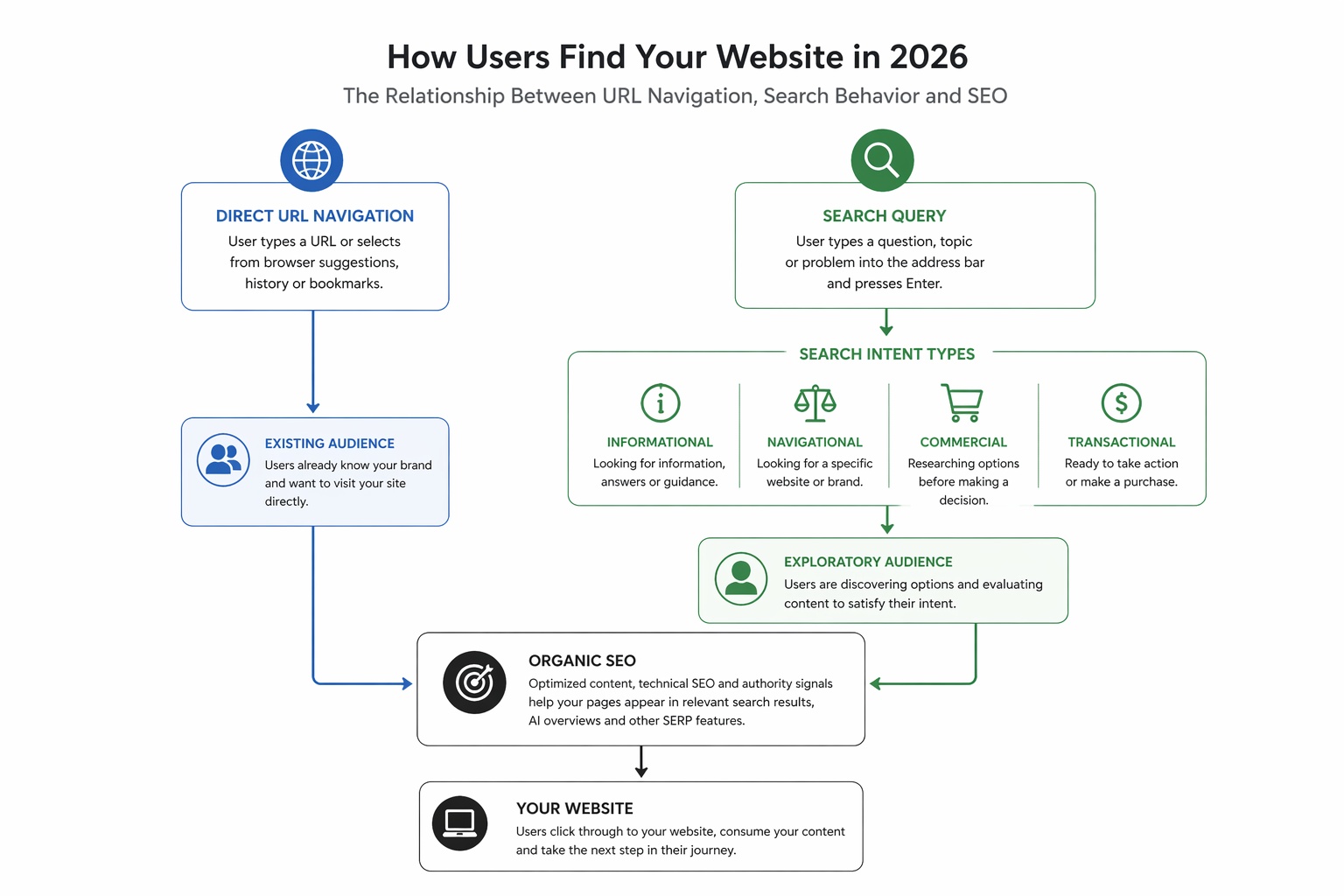
The first kind already knows where they are going. They type a URL directly or select a suggestion from their browser history. These visitors are your existing audience. They already know you, have visited before, and decided to return. Direct traffic in your analytics represents this group. It is valuable, but it is also inherently limited because it only includes people who already found you somehow.
The second kind is still exploring. They type a question, a topic, or a problem description into the address bar, and the browser sends that to a search engine. These visitors do not have a specific destination in mind. They are evaluating options, looking for the best answer to a specific question, or trying to understand something they have not encountered before. Organic search traffic in your analytics represents this group.
Organic search visitors are where growth comes from. When someone types canva.com into their browser, Canva already has that visit secured. When someone types easy design tools for small businesses, every well-optimized website in that space has a chance to earn that visit. That gap is the entire reason SEO exists as a discipline.
The question SEO answers is simple: when someone types something relevant to your business into the address bar and presses Enter, does your content appear? And if it appears, does it appear prominently enough that the person actually clicks through?
What URL Structure Has to Do With Search Rankings
The URL itself, the web address that appears in the browser bar, is not just a navigation tool. It is also a signal that search engines use to understand what a page is about.
Search engines analyze URL structure as one indicator of content relevance. A page with a URL like fluxserp.com/blog/ai-seo-tools-guide tells a search engine something meaningful about what that page contains before a single word of content is read. A page with a URL like fluxserp.com/p=1847 tells a search engine almost nothing.
Clean, logical URL structures that include descriptive keywords contribute to better indexing, clearer topical signals, and a more predictable user experience for visitors who see the URL in search results before clicking. This is one reason URL architecture is treated as a technical SEO fundamental rather than a cosmetic preference.
When thinking about the AI SEO toolkit and how search engines evaluate pages today, URL structure sits alongside title tags, heading hierarchy, and internal linking as the basic structural signals that tell crawlers what a page is about before content quality signals take over.
How Search Behavior Is Changing in 2026
The mechanics of the address bar have been stable for years, but what happens after someone presses Enter has changed significantly. In 2026, a growing share of search queries do not result in the user clicking through to a website at all. AI-generated answers, featured snippets, and knowledge panels satisfy a meaningful percentage of informational queries directly within the search results page.
This shift has two implications. The first is that appearing in traditional organic results is increasingly necessary but no longer sufficient on its own. Sites that also appear in AI Overview citations, featured snippets, and other SERP features capture traffic that would otherwise never reach them through standard blue-link results.
The second implication is that the queries where organic clicks still happen in significant volume are increasingly the ones with commercial, transactional, or deeply specific informational intent. Someone asking a simple factual question may get an answer from an AI summary without clicking anything. Someone asking which AI SEO tool tracks keyword rankings across multiple languages is much more likely to click through to a specific page that answers their specific question comprehensively.
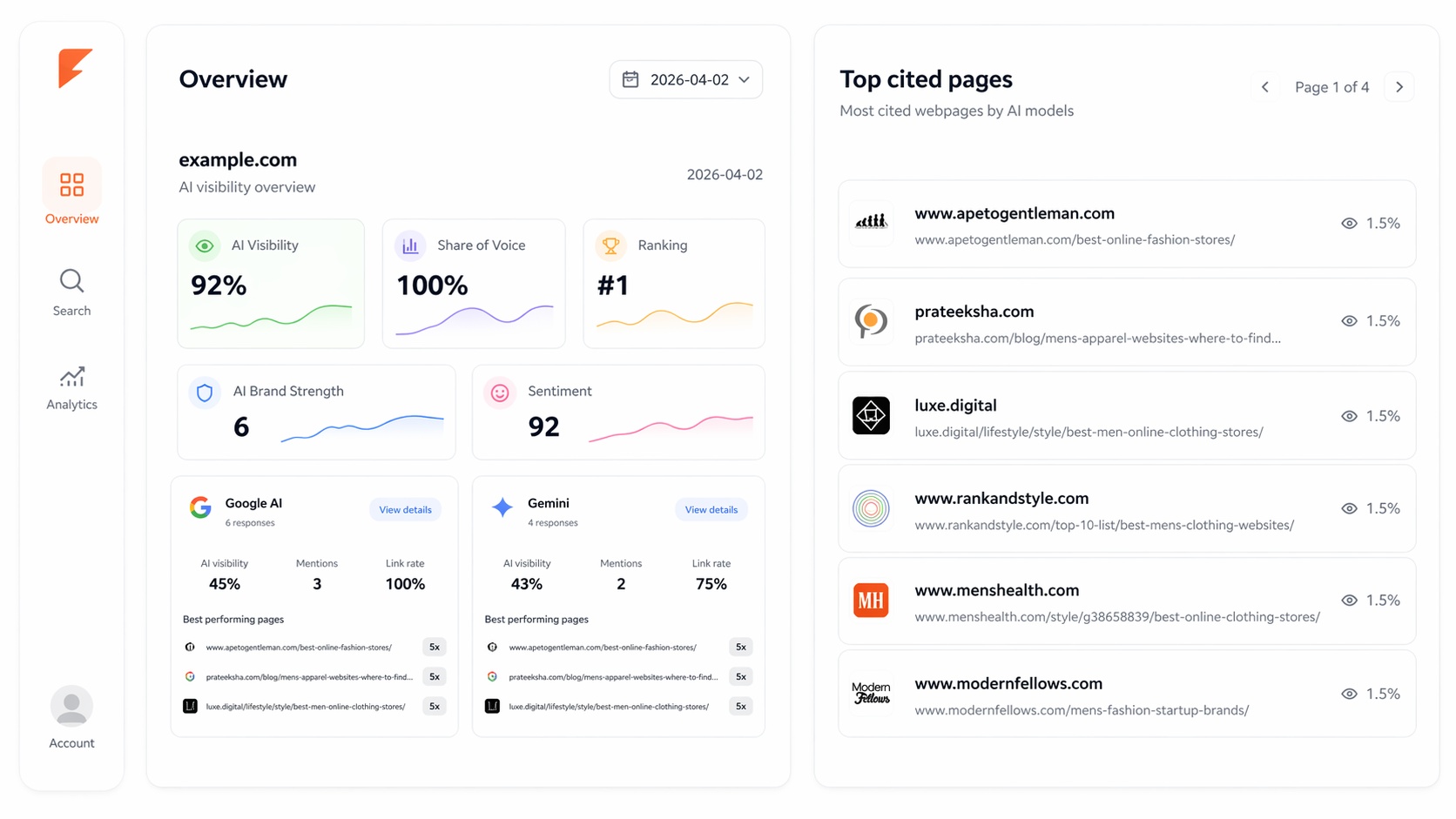
This makes keyword research and intent mapping more important rather than less. The FluxSERP SEO toolkits track both traditional ranking positions and AI Overview citation patterns, which gives a much more complete picture of where your content is actually reaching people versus where it is being bypassed by AI-generated answers.
When Search Results Do Not Send You Where You Expect
Most browsers work smoothly most of the time, but there are specific failure patterns worth understanding. Sometimes typing a URL triggers a search instead of navigating directly. This usually happens because the input is ambiguous enough that the browser defaults to search behavior. Adding the full domain extension like .com or .org resolves this in almost every case.
A more serious version of this problem involves browser hijacking. This is when an extension, piece of malware, or unauthorized software modifies your browser settings so that your searches go to an unfamiliar search engine, your homepage changes without permission, or typing URLs results in redirects to unexpected destinations. The signs are consistent: search engines change without you changing them, settings you adjust revert on their own, or toolbars and extensions appear that you did not install.
When this happens, the recommended steps are to review your installed extensions and remove anything unfamiliar, reset your browser to its default settings, and run a malware scan. Enterprise-managed browsers on work or school devices sometimes have locked settings that look like hijacking but are actually controlled by an IT administrator, which is a different situation entirely.
The SEO Lesson Hidden in the Address Bar
The phrase Search Google or type a URL encodes something genuinely important about how the internet works as a marketing channel. Direct navigation, the URL side of the equation, represents your existing relationship with an audience that already knows you exist. Organic search, the search side of the equation, represents your opportunity to reach people who have never heard of you but are actively looking for exactly what you offer.
Most businesses want more of the second kind of traffic. They want to be found by people in the moment of active searching, before those people have developed brand loyalty to a specific destination. That moment of exploration, when someone types a query and waits for results, is where organic SEO creates value.
Building content that captures those moments requires understanding not just what people search for, but why they search for it and what kind of answer would actually satisfy the intent behind the query. Someone typing how to improve my website SEO is not looking for a definition of SEO. They are looking for a practical path forward, specific steps they can take, and tools that will help them execute. Content that recognizes this distinction performs better than content that does not, regardless of how well the other technical signals are optimized.
The FluxSERP platform is built around tracking exactly this kind of performance, showing you which of your pages are capturing search moments, which are being bypassed, and where your competitors are earning the traffic that could be going to you instead.
Frequently Asked Questions
Is the "Search Google or type a URL" message a sign of a virus?
No. It is standard browser functionality that appears in every modern browser. The message simply describes what the address bar does: it accepts both web addresses and search queries. A reason for concern would be if your search engine changes without your input, your homepage changes on its own, or your URL entries consistently redirect somewhere unexpected. Those patterns can indicate a browser hijacker or malware, but the prompt itself is completely normal.
Why does typing a site name sometimes trigger a search instead of navigating there?
Single-word inputs create ambiguity for browsers because they could be a web address, a search query, or a brand name. The browser defaults to search when it cannot be confident. Adding the domain extension resolves this immediately. Typing instagram.com instead of just instagram will navigate directly. Alternatively, on Windows and Linux, you can type the name and press Ctrl and Enter simultaneously to auto-complete with the www prefix and .com suffix.
Does what I type in the address bar get sent to Google?
When search suggestions are enabled, your browser sends the characters you type to your default search provider in real time. This applies regardless of whether you use Google, Bing, DuckDuckGo, or another engine. If this data sharing concerns you, search suggestion features can be disabled in browser settings. Disabling suggestions means the browser relies on local history and bookmarks rather than querying the search engine while you type.
How does URL structure affect SEO?
Search engines read URL structure as an early signal about page content before evaluating the actual text on the page. Descriptive URLs that include relevant keywords give search engines a clearer topical signal and make it easier to match pages to relevant queries. Short, descriptive URLs also tend to perform better in click-through rates from search results because users can read the address and form a reasonable expectation about what they will find before clicking.
What is the difference between direct traffic and organic traffic in analytics?
Direct traffic in web analytics represents visitors who typed your URL directly, used a bookmark, or arrived through a source that could not be identified. These are largely people who already know your site. Organic traffic represents visitors who arrived through a search engine after typing a query. These are people who found you through search rather than navigating directly. Organic traffic is typically the primary growth channel for sites trying to reach new audiences.
How should businesses think about the balance between search and direct traffic?
A healthy mix of both is ideal. High direct traffic suggests strong brand recognition and audience loyalty. High organic traffic suggests effective search presence and the ability to reach new audiences. Very low organic traffic relative to direct traffic often means a site is not capturing enough exploratory searches from people who do not already know the brand, which caps long-term growth potential. Using an AI visibility tracking tool gives a clearer picture of where your content is and is not appearing across both traditional search and AI-generated answer surfaces.
The address bar is the starting point for almost every internet session. Whether someone types a URL or a search query in that bar determines whether your site needs to be found or is already known. SEO is fundamentally the practice of making sure your site can be found by the right people in the right moments, before they know to type your URL directly.
Discover Which Searches Are Actually Sending Traffic to Your Site
FluxSERP tracks your keyword rankings, AI Overview citations, and competitor positions so you know exactly which search queries are driving your organic growth and where the next opportunity is hiding.
Start for Free
Catalin Dinca
Written by Catalin Dinca